
By Dan · February 15, 2026
Under the Hood: How Run Plan Actually Builds Your Plan
This is the under-the-hood article: the dials, the numbers, and the actual formulas the engine evaluates when it says “Tuesday: 6×800m.”
The engine is now open source. It lives in a Swift package called TrainingPlanKit — the same code the app ships, with the iOS and watch layers and the localization stripped off. Everything below is in there; the snippets are lightly trimmed for reading, and links point at the file they came from.
Short article. Lots of code. No marketing.
What “load” is
Everything below is denominated in load, so start there. Load is a single number that stands in for how much a workout costs you — roughly intensity times duration, the same idea as TSS in TrainingPeaks or Training Load in Garmin. Every workout in the catalog carries one, computed up front from its intervals:
public struct Workout {
    public let duration: Int64       // seconds
    public let trainingLoad: Int64   // the single effort number
    public let intervals: [WorkoutInterval]
    // ...
}
Why one number and not just minutes? Because minutes lie. An easy run and a hard interval session can take the same wall-clock time and cost the body completely different amounts. The catalog bears that out — here are three sessions of roughly equal length:
Easy Run                 45 min   load  3,238
Threshold (2 × 12min)    40 min   load  6,739
Time Trial (25min)       45 min   load 12,434
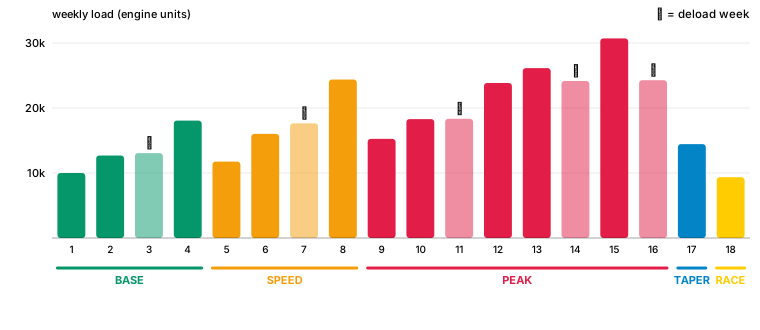
Same time on your feet, four times the cost. That is the whole point of a load metric: it lets the engine compare a sprint session to a long aerobic plod on one axis. When you read “target load 13,600” below, picture roughly a week’s worth of those numbers added up. The bars in the charts are load, not distance.
The shape of a plan
Every plan is four phases plus race day:
BASE  →  SPEED  →  PEAK  →  TAPER  →  RACE
 25%     35%      30%     10%      ← half-marathon shape
A marathon tilts the same skeleton harder into PEAK — about 40% of the plan — because a marathon runs on race-specific volume. A 5K leans into SPEED instead. The percentages above are the half-marathon shape; the phases never change, only the weighting.
Each phase has a load multiplier on top of your baseline. Multiply the baseline by the multiplier → that’s the target weekly load for that phase.
| Phase | Multiplier | What changes |
|---|---|---|
| BASE | 1.0× | Aerobic foundation. Easy runs + one long run. |
| SPEED | 1.35× | Intervals appear. Threshold work appears. |
| PEAK | 1.7× | Race-specific. Highest combined volume + intensity. |
| TAPER | 1.19× → 0.85× | Volume drops. Intensity preserved. |
Got extra weeks? They go to PEAK. That’s the phase where the biggest adaptations happen.
Your baseline load
You pick a level and a distance at plan creation. Every plan declares its own starting load in a config struct — there is no per-level switch in the generator any more, each plan just carries its own number with the level-and-distance shaping already folded in. Beginner sits flat at 4,500 across every distance; the fitter tiers vary by race:
| Level | 5K | 10K | Half | Marathon |
|---|---|---|---|---|
| Beginner | 4,500 | 4,500 | 4,500 | 4,500 |
| Intermediate | 9,200 | 11,040 | 8,000 | 10,000 |
| Advanced | 16,100 | 19,320 | 21,000 | 17,500 |
“Load units” are arbitrary internal numbers — what matters is the ratios. An advanced runner does roughly 3.6× to 4.7× the weekly work of a beginner at the same distance. The numbers don’t climb monotonically with race length: an advanced half plan carries more load than an advanced marathon, because the half is run harder per minute and the marathon spends its volume on slower miles. Load is effort, not kilometres. And baseline means week one, not the plan: longer races get longer plans, and a longer ramp starts lower. The intermediate half (14 weeks) begins gentler than the intermediate 10K (9 weeks) — and peaks far above it. (The whole table is in the per-tier config files — one struct per plan, all the shaping visible in one place.)
Quick worked example. Intermediate runner, 16-week half-marathon plan, baseline 8,000:
BASE  weeks (4):   8,000  ×  1.0   =  8,000 units/wk
SPEED weeks (5):   8,000  ×  1.35  = 10,800 units/wk
PEAK  weeks (5):   8,000  ×  1.7   = 13,600 units/wk
TAPER weeks (2):   ramp down from ~9,500 → 6,800, race week last
That table is the phase skeleton. The real per-week number has one more term: within a phase, load also climbs across the weeks. It is not flat, it ramps.
How a week’s target gets built
One function, calculateWeeklyTargetsV3, produces the target load and target duration for every week. Stripped to its spine it is three multipliers:
load = baseLoad × phaseBoost × progressionFactor

//  baseLoad         your plan's starting number (table above)
//  phaseBoost       1.0 / 1.35 / 1.7 — which phase you're in
//  progressionFactor where you are *inside* that phase
The first two we have. The third is the wave. As you move through a phase, phaseProgression runs from 0 to 1, and the engine turns that into a small upward push:
let progressionFactor =
    1.0 + (phaseProgression
           × increasePercent / 100
           × progressionAmplifier)   // progressionAmplifier = 5.0
increasePercent is the plan’s declared week-to-week ramp — an intermediate half carries 17–26%, the engine uses the midpoint. The amplifier of 5 is the piece that makes it visible: a ~21% midpoint over a 5-week phase, spread linearly, would barely register week to week, so the factor stretches it into a real climb from the phase floor up to roughly +20% by the last full week. That is why each phase in the chart is a rising staircase, not a flat block.
Two clamps sit on top of all this, and they are the reason a faithful textbook number never quite lands raw. First, the phase-end deload: once you cross 80% of the way through a phase, the closing week is notched back ~25% so you enter the next phase fresh rather than maximally fatigued. Second, an ACWR cap — acute-to-chronic workload ratio, the injury-risk number the literature keeps pointing at. No single week may exceed 1.25× the largest of the last three weeks’ volume; if the formula asks for more, the week is scaled down to the cap and its load comes with it:
// cap volume at 1.25× the recent 3-week max, scaling load with the cut
let capDur = recentDur.max()! * 1.25
if rawTargets.duration > capDur {
    let scale = capDur / rawTargets.duration
    targets = WeeklyTargets(load: rawTargets.load * scale,
                            duration: capDur, ...)
}
The ramp wants to push; the cap refuses to let any one week spike more than a quarter above where you have actually been. A coach does this by feel. The engine does it with one comparison against a three-week rolling max.
Duration is computed the same way in the same breath — same phaseBoost × progressionFactor, applied to a starting weekly minutes figure. Load tells the engine how hard the week is; duration tells it how long. Both targets go to the workout picker together, which is where the two are reconciled into actual sessions.
Phase transitions don’t slam
Old version of the engine did this:
Week 4 (last BASE):    8,000 units  ←  end of BASE
Week 5 (first SPEED): 10,800 units  ←  +35% overnight. ouch.
That’s a step change of 35% in a single week. Real bodies don’t love that. We watched a couple of runners injure themselves at phase transitions in v1.6.
Now we ramp:
// Smooth phase transitions
let multiplierTarget = phase.loadMultiplier   // e.g. 1.35 for SPEED
let weekInPhase = currentWeek - phaseStart

let ramp: Double
switch weekInPhase {
case 0: ramp = 0.5  // 50% of the increase in week 1
case 1: ramp = 0.75 // 75% in week 2
default: ramp = 1.0 // full multiplier from week 3 onward
}

let effectiveMultiplier = previousPhase.multiplier
    + (multiplierTarget - previousPhase.multiplier) * ramp
Week 1 of a new phase: half the bump. Week 2: three-quarters. Week 3 onward: full.
Same total work over the phase. Way less injury risk.
Recovery weeks aren’t a chore
Every 3rd week of a build phase — BASE included — the engine drops the load by 15% (25% on Pro plans). Same training. Less stress. Body catches up.
let isRecoveryWeek = weekInPhase % 3 == 2   // weeks 3, 6, 9 of a phase
                  && phaseDuration >= 4      // short phases skip it

let weeklyLoad = baseload
    * effectiveMultiplier
    * (isRecoveryWeek ? 0.85 : 1.0)          // 0.75 on Pro plans
Build two weeks, absorb on the third. Repeat. Adaptation happens during the recovery, not during the load. (Say it twice. It’s counterintuitive.)
Plus a phase-end deload: when you cross 80% through any phase, the engine notches load back another ~25% for the closing week. Lets you transition into the next phase fresh.
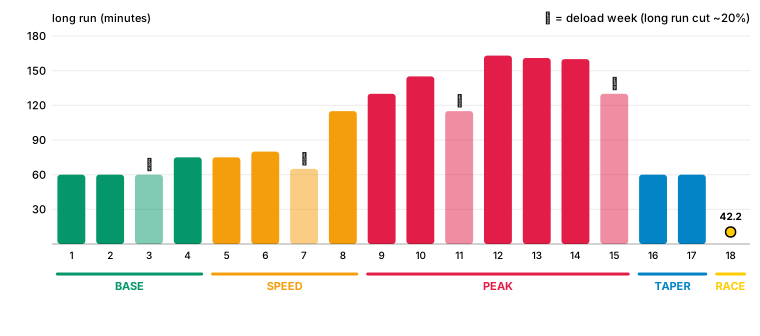
The long run is the plan’s single biggest stressor, so it gets its own handling. It climbs through the build, drops about a fifth on every deload (▾), then unwinds through the taper. The longest run of the whole plan sits in PEAK — not, as it once did for slower runners, two weeks before the race.
How a single workout gets picked
This is the part that turns numbers into a calendar. The week now has a slot — a target load and a target duration. The pool is a list of real workouts already filtered to ones that belong in this phase, at this level (a beginner’s pool has had the Zone 5 sessions removed before this point; the picker never has to know about level). The job: choose the workout that fits the slot best.
The scorer is selectWorkoutByTargetV3. One thing to flip in your head first — here a lower score wins. Score is error-from-target, and we want the least error. It starts as the distance to the slot on the two axes that matter:
let loadDiff     = abs(workoutLoad - targetLoad) / targetLoad
let durationDiff = abs(workoutDuration - targetDuration) / targetDuration

// lower is better. load matters a bit more than duration.
var score = loadDiff × 0.3 + durationDiff × 0.2
Both terms are relative error, so a workout 10% off on load costs the same whether the slot is small or huge. Load is weighted a little heavier than duration (0.3 vs 0.2) because hitting the right effort matters more than hitting the right clock time — a 45-minute session at the wrong intensity is a worse substitute than a 40-minute one at the right intensity.
If that were the whole story you would get the same closest-match workout week after week, because the closest match does not change week to week. So the score also carries memory — penalties that push the picker off the obvious repeat:
// seen this exact workout already this phase? small nudge per use.
score += usedIds[w.key, default: 0] × 0.05

// same workout as LAST week? strong shove away.
if w.key   == prev.key   { score += 2.0 }   // sameWorkoutPenalty
// same title, different duration? still feels repetitive — shove.
if w.title == prev.title { score += 0.8 }   // sameTitlePenalty
Those anti-repetition penalties are deliberately large enough to dominate the match terms. A workout 2.0 worse on score has to be a far tighter target fit to win — which is exactly the trade we want: week-to-week novelty beats a marginally closer number. The usage term is a counter, not a flag, so the fourth time a hill session comes up its penalty has quietly quadrupled and something else gets a turn.
One more nudge, for the quality sessions specifically. When this week’s candidate is the same type as last week’s — another threshold, another interval set — the scorer looks at the rest intervals and reads them as progression. On a build week it rewards equal-or-shorter recoveries (denser, harder); on a deload week it rewards equal-or-longer ones (more forgiving). The plan sharpens in the right direction without anyone hand-writing “make week 6 harder than week 4”.
Lowest score wins, gets marked used, and the picker moves to the next slot. The whole thing is about forty lines. The full weighting table and the scorer live in PlanGeneratorV3.swift — almost everything interesting about how a plan feels is in those constants, and most of them were set by generating a plan, reading it, and adjusting one number.
Where the easy/hard split comes from
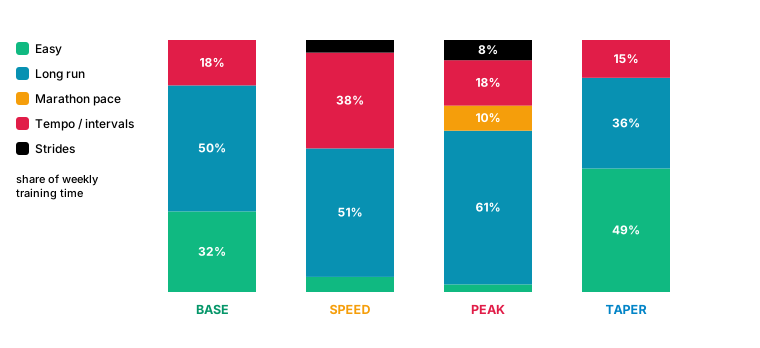
You may have noticed nobody told the engine to make 80% of running easy and 20% hard — the famous polarized ratio. It is never written down as a rule. It falls out of the parts above.
A plan declares a rough type budget — about 40% easy, 30% long run, 20% intervals, 10% other quality — so only a minority of sessions are hard to begin with. Then the load math does the rest. The weekly load and duration targets are sized so that hitting them mostly requires aerobic running; the hard sessions are short, so they spend a lot of the week’s intensity budget while spending little of its time. Add it up by minutes and the easy/hard split lands near 80/20 on its own. The engine is not enforcing a famous number. It is enforcing load, and the number is what load looks like when you do it sanely.
Variety, and the recovery-week reshape
Monotony is its own failure mode — a plan you can predict is a plan you stop reading. The duplicate and usage penalties above are the first defense: they keep the same session from landing two and three weeks running, and they rotate the pool so a 16-week plan draws on most of its catalog rather than parking on one cheap hill workout.
The second is the recovery week, and it does more than drop the load number. A coach on a down week removes real work, not just a percentage. So on every recovery week the engine reshapes the week itself — applyDeloadReshaping — and what it does depends on how full the week is:
// recovery week, build phase only
if week.count >= 5 {
    // busy week: drop the biggest easy filler — a real rest day appears,
    // long run and quality untouched.
    drop(largestAerobicFill)
} else {
    // leaner week: keep the days, kill the intensity. swap the single
    // heaviest quality session for a progression run (or an easy run)
    // of similar length.
    replace(heaviestQuality, with: nearbyProgressionOrEasy)
}
On a five- or six-day week, taking a day off is the recovery, so the engine removes the largest easy filler and leaves you a genuine rest day — never the long run, never the quality. On a leaner three- or four-day week there is no spare day to give back, so it keeps the days and pulls the teeth instead: the hardest session of the week becomes a progression run at roughly the same duration, a real but gentler stimulus. Either way the down week looks different from the weeks around it, which is the point — the body gets the break and the calendar stops being a copy of last week.
(An earlier version of the engine had a separate “surprise week” that swapped a threshold for a progression run on a fixed schedule. It is gone — the duplicate penalty and the recovery reshape cover the same ground without a second mechanism bolted on beside the deload.)
What changes by level
The engine doesn’t just rescale the load. Three things change with level:
Beginner — Zone 5 workouts excluded entirely (too intense, injury risk). Recovery intervals are longer (~75s vs. ~45s for intermediate). Gentler week-to-week progression (18-26% across a phase vs. up to 26% for advanced). Long runs progress from 60min → 120min over the plan.
Intermediate — full intensity spectrum. Standard recovery intervals. Mix of progression runs and easy runs as filler.
Advanced — full spectrum. Shorter recovery intervals (the engine wants you to build resilience under fatigue). Multiple quality sessions per week. More aggressive phase ramps.
Pro — a different animal. Six days a week, built on the Pfitzinger 18/70–18/85 shell by name, anchored to a recent race result instead of a goal time. Medium-long runs midweek, threshold work nearly every week, the long run carrying marathon-pace segments. Baseline load 20,000 — about 4.4× a beginner’s.
Same engine, same four phases, the whole way up. Here’s one race — a marathon, 22 weeks — built at all four levels and laid over each other:
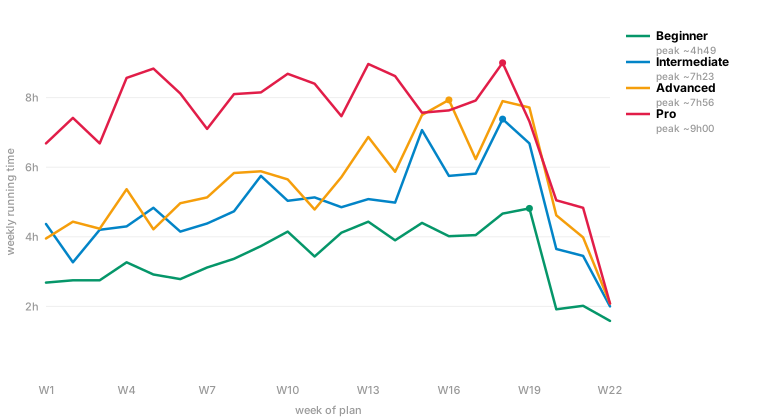
One thing the chart gives away: Pro’s peak is capped. Left alone, the 18/85 math wants ten-hour weeks, and a faithful engine would hand them over. We hold it near nine. A ten-hour week breaks more amateurs than it builds, and the person who picks a sub-3 plan is still an amateur with a job — the textbook doesn’t know that. We do.
The textbook plan and the real-life plan
Everything up to here is the textbook. Higdon’s long runs, Pfitzinger’s mesocycles, Daniels’ paces — the plan a good coach would actually write. Five or six days a week. It is correct.
It is also more than a lot of people can give. A 10K runner with two kids and a commute does not have five running days. Hand them the five-day plan anyway and they fall off it in week three — and feel bad about it. Guilt is a terrible retention strategy and a worse training one. Nobody got fitter from a plan they stopped opening.
So the engine ships two of every non-Pro plan. The textbook set is the one above. The accessible set is the same race on fewer days, with the beginner tiers turned gentler — a deliberate product call, shown as its own card, never the silent default. Pick the one that fits the life you actually have. Both are real plans.
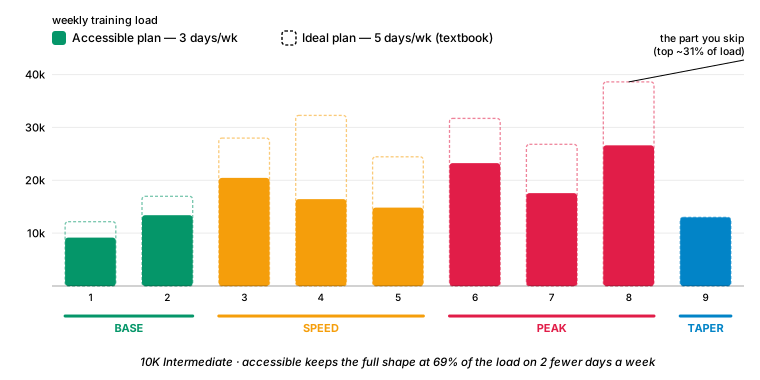
The hard part isn’t cutting load — it’s cutting the right load. A three-day week can’t hold two hard sessions and still leave a genuinely easy day; do it anyway and you’ve built a harder plan, not a lighter one. So the accessible plans cap quality at one session a week and spend the freed days on easy aerobic running. Fewer days, same shape, the intensity that’s left pointed at the sessions that matter most. This is the one place the product overrules the textbook on purpose.
How the code actually got written
We didn’t write the engine alone. The first year was a lot of copy-pasting between ChatGPT and Claude chat windows — long context, “here’s the engine, what’s wrong with this scoring loop?” sessions. Then Claude Code arrived and became the CLI workflow. Briefly tried Antigravity (rough). A few months on Codex which was genuinely great. Currently back on Claude Code most days.
Most of the engine refactors in this article — phase transitions, recovery cadence, the deload reshaping — came out of “OK Claude, think out loud with me about why this transition is jagged” sessions. Three approaches proposed, one picked, push back when the proposal was wrong (it often was). It feels like pairing with a colleague who has read every Swift blog post on the internet and forgotten which one said what. Net very positive, but it took a year of practice to know when to trust which output.
A worked plan
Concrete: 16-week intermediate half-marathon plan, top to bottom.
Phase split:    BASE 4  →  SPEED 5  →  PEAK 5  →  TAPER 2
Base load:      8,000 units/wk
Peak load:      13,600 units/wk (week 13)
Recovery wks:   3, 7, 12 — plus a deload closing each phase
Long runs:      12 of them, 60min → 110min progressive
Quality:        24 interval/threshold sessions total
Easy/recovery:  28 easy runs as filler
Catalog draw:   ~50 distinct workouts (no repeats inside ~3 weeks)
That’s everything the engine knows about you: race distance, weeks-to-race, level, training days per week, HR vs pace mode. From those five inputs the engine produces a calendar with specific workouts on specific days, deterministically. Same inputs tomorrow = same plan.
(That last sentence is the one most other apps cannot make.)
What’s next
Things on the engine roadmap:
- Adaptive load. Right now the engine uses your initial level forever. We’re building a Sunday-evening review that reads HealthKit completion and bumps next week up or down. Local. Nothing leaves the device.
- Time trials. Periodic 3K/5K all-out efforts that auto-recalibrate your pace zones mid-plan.
- Readiness signal. HRV + resting HR + sleep → traffic light. Green push. Yellow ease. Red maybe swap quality for easy.
Each of these is a few weeks of evening work + a CLI audit pass. They’ll get their own articles when they ship.
Run Plan is an indie iOS + Apple Watch training planner built by a 2-person team in Amsterdam. No accounts, no ads, no subscription. Your data stays on your device.