
By Dan · May 17, 2026
The 8-Month Bug That Almost Made Us Quit
We almost shelved this app.
Not the App Store, not competitors, not money. One bug on the Apple Watch — couldn’t see it cleanly, couldn’t reproduce it, couldn’t fix it for eight months. It quietly made the app feel slow that whole time.
The setup
Run Plan is two of us. Katya owns UX — what the screens should be, whether the scenarios hold up end to end, whether the app feels right on the wrist mid-workout. She runs more than I do, which is how most of those instincts arrive. These days she also writes a lot of the code; the engineering line and the design line stopped being a line a while ago. I’m the engineer nominally. Both of us have day jobs. The app gets built after dinner, on Sundays, sometimes on a lunch break. One Apple Watch SE 2 between us, one iPhone each — the whole test rig.
No beta group at this point. We were the main users, and for a stretch the only ones. So the only signal on whether the app felt good was how it felt to us.
The symptom
Present from v1.3 — eight months before the version that’s out now. Constant. In the way bad UX is constant: you live with it, you adjust, you stop noticing.
- Wrist-raise mid-workout → screen stays dark, or activates seconds later. Should be instant. Ours wasn’t.
- Timer numbers lag. Apple Fitness updates smoothly. Ours stuttered.
- Pace counter slow to refresh — display throttling was correctly tuned; the underlying state wasn’t updating at the rate we’d intended.
- Heart rate animations hitch.
- Battery on a 90-minute workout — meaningfully worse than expected.
The part I missed: I had adjusted. I’d been the only tester for so long that “the watch is a bit sluggish during workouts” was my baseline. The app wasn’t bad — usable, workouts ran, data got recorded, plans got followed. It just didn’t feel cool or light. The kind of slowness you live with stops feeling like UX. It starts feeling like the platform.
The “wait, it shouldn’t feel like this” moment
What finally made the bug visible: Katya did a couple of workouts in Apple Fitness — Apple’s first-party app, the system reference — instead of Run Plan.
Wrist-raise: instant. Timer: smooth. Wake-up: immediate. The watch felt responsive in a way ours didn’t.
She came back and said, more or less: “this isn’t supposed to feel the way ours feels.”
That’s when I realized our wrist-raise lag wasn’t normal. We had introduced it. The platform wasn’t sluggish. Our app was making it sluggish.
That’s the cost of being a small team without a beta group: you become the calibration baseline for your own product. Bugs you’d notice instantly in someone else’s app become “just how things work” in yours. Nobody around to compare against. The drift is silent.
The week I actually debugged it
Step one was the obvious thing. Run the app from Xcode, connected to the real Watch, watch what happens.
This turned out to be nearly impossible.
In spring 2025 — early days — I could connect Xcode to the real Apple Watch and run debug builds on it. No problem. By 2026 (different Xcode, different watchOS, different iOS, same physical watch), the workflow had become a series of cascading failures:
- Xcode “Preparing your iPhone…” for indefinite periods. Sometimes it resolved. Often it didn’t.
- The watch refused to pair for debugging — despite being paired with the iPhone for normal use.
- Mid-debug disconnects when I did manage to connect.
- The “repair iPhone with Xcode” dance — Xcode unpairs and re-pairs the device, sometimes wiping debug symbols, sometimes losing the watch pairing on the way.
- iOS toolchain updates blocking everything — iOS pushes a point release, Xcode now requires a matching toolchain, you download a multi-GB Xcode update before you can try debugging again.
The experience for one or two evenings: try to connect → fail → restart Xcode → try again → update something → wait → fail → try a different cable → try wireless → disconnect mid-trace → repeat.
It felt like Windows in 2008.
Editorial aside. I genuinely do not understand why Instruments on Apple Watch is this bad. Maybe it’s me holding it wrong. But the Apple Watch developer experience has to get better than this — not “match desktop debugging,” just “let the Watch-side profiler and log stream work twice in a row without a reboot.” It’s Apple in the end. If not them, who?
Logging didn’t help much either. I tried piping extensive logs to somewhere I could retrieve them — invent a way to get logs off the watch when Xcode wouldn’t talk to it. The few I captured had thousands of lines during a workout. All reasonable in isolation. None obviously pointing at a problem.
After a couple of evenings of this with no real progress, I started thinking about deprioritizing the project significantly. Not killing it. Parking it. Weekends only. Maybe coming back in a month or two when I had more energy. Not because the bug was insurmountable — I didn’t even know what the bug was — but because the work-to-progress ratio was crushing.
Xcode would not pair the Watch. Again. Most evenings ended that way for a while — an hour of pairing dance, no debugger session attached, nothing learned. Katya was patient with me; I was not.
The thing nobody tells you about indie development with a full-time job: the project doesn’t fail in a single moment. It fails by attrition. Day after day of “I sat at my laptop for three hours and accomplished nothing” eventually breaks you down.
How I actually found it: bisection
Out of better ideas, I started bisecting the UI by brute force.
The approach:
- Comment out a large UI component — a whole tab, a list view, a status overlay.
- Build. Send to the watch.
- Test for 3-4 minutes.
- Did the sluggishness improve? No → restore that component, disable the next one. Yes → found the area; now narrow.
Several days of this. Each iteration was pretty much: ask Claude what to try next, make the edit it suggested (or push back on it), wait for the build, install on the watch, test at home for 3-4 minutes — wrist raises, brief screen interactions, a fake workout started indoors to put the app into its workout state. No real run needed for this part — the lag manifested on the couch. Observe, write down what I saw, next iteration.
I was leaning on Claude heavily here. For hypotheses. For walking through what could re-trigger work on a wrist-raise. Sometimes for the actual diff. The week was a Claude-as-buddy session — I’d describe what the watch was doing, Claude would propose hypotheses, I’d reject most of them, occasionally one would land. Pairing with a colleague who has read every Apple developer forum post on the internet. Sometimes maddening. Net very useful. ~20 iterations per evening. A hundred or so across the week.
A couple of bisection rounds away from putting the whole project on the back burner. The frustration was specific: I knew the bug existed. I could feel it during runs. But I couldn’t find it in code. And the tools that should have helped me find it (Xcode debugger, Instruments, log streams) weren’t working.
One evening I disabled WorkoutListView — the screen that shows your upcoming workouts as a scrollable list, which is the default tab of the Watch app. Built. Sent to the watch. Wrist-raise.
Instant.
Timer: smooth. Watch felt right.
I sat there for a minute. I think I said “no” out loud.
Wait. Wait. This is the genuinely surprising part — the part that had made the bug so hard to find. WorkoutListView isn’t visible during a workout.
When you start a workout, the workout tracker view takes over the screen. WorkoutListView sits behind it in the NavigationStack, off-screen, invisible. The symptom showed up in the visible workout view (laggy wrist-raise, stuttering timer, hitching HR animation). The cause was in a screen I couldn’t see.
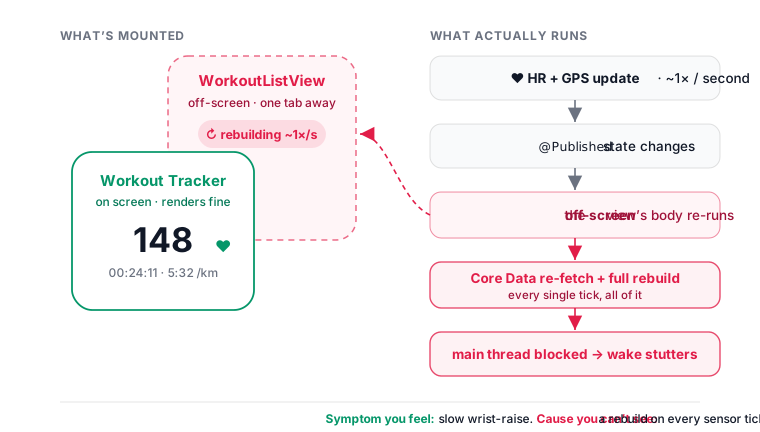
That mismatch is why I’d spent the previous week looking in the wrong place. I’d been searching the visible workout views — heart rate animation code, timer code, the active workout body — for anything expensive. The bug wasn’t there. It was one tab away, off-screen, doing expensive work because SwiftUI was still re-evaluating its body in response to workout-time @Published flips.
Symptom and cause in different parts of the app. Connected by a SwiftUI mechanic you wouldn’t think about unless you’d been bitten by it before.
That narrowed it. Now the question was what in WorkoutListView was the problem.
What the runs were and weren’t for
This particular bug, as it turned out, was reproducible indoors — start a fake workout, sit on the couch, wrist-raise, watch the lag. That’s what made 20 iterations an evening possible. We got lucky there.
The real runs mattered for the surrounding things. The original signal — “this feels sluggish in a way Apple Fitness doesn’t” — came from actual runs, not couch sessions. The pace counter and battery symptoms only show up over a real 60-90 minute outdoor workout. And confirming the fix held up needed a real run too: clean wrist-raise on the couch is one thing, clean wrist-raise mid-tempo with a wet sleeve and a heart rate of 165 is the actual product moment.
Our outdoor test setup: Katya wearing the Apple Watch SE 2 with the latest Run Plan build, me running alongside her with a Garmin Forerunner 955 for pace and HR ground truth. Comparing what the SE 2 displayed mid-workout to what the Garmin displayed in parallel was the only way to separate “actually broken” from “noisy because GPS.” Mid-week, after a full day of work, in the rain, with two watches between us. Absurd setup. Cheapest reliable test rig we had.
Over those eight months we did hundreds of runs — some specifically to test a build, most just Katya’s actual marathon training, plenty of both at once. The line between “I’m out running for fun” and “I’m out running to test a specific build” got blurry. Sometimes it was genuinely enjoyable. Most of the time, especially when chasing a bug, it wasn’t.
There’s a version of this story that’s a charming indie founder anecdote. Living through it didn’t feel charming. It felt like we were stuck.
The fix
Once I’d narrowed it to WorkoutListView, the code itself was easy to read. The culprit, when I finally saw it, was almost funny.
WorkoutListView has a helper called generateRows() that builds the row data. Walk forward from today. For each future date, look up whether there’s a workout that day. If not, insert a rest-day placeholder. Standard stuff.
Here’s the buggy shape, simplified:
struct WorkoutListView: View {
    @ObservedObject var workoutManager: WorkoutManager
    @ObservedObject var planManager: PlanManager

    var body: some View {
        List {
            // Called inside body. Re-runs on every @Published flip.
            ForEach(generateRows()) { row in
                WorkoutRowView(row: row)
            }
        }
    }

    func generateRows() -> [WorkoutRowModel] {
        let workouts = CoreDataManager.shared.fetchAllEvents()  // sync, main thread
        var rows: [WorkoutRowModel] = []
        for date in futureDates {  // ~100 dates
            // O(n×m): linear scan over all workouts for every date
            if let w = workouts.first(where: { $0.date == date }) {
                rows.append(.workout(w))
            } else {
                rows.append(.rest(date))
            }
        }
        return rows
    }
}
The bug: generateRows() was being called from inside the SwiftUI body. So every time SwiftUI re-evaluated the body — and SwiftUI re-evaluates body on every @Published change in any observed object — the rows were regenerated from scratch.
In a workout context, those @Published flips happen constantly:
- Heart rate updates ~once per second.
- Elapsed time updates several times per second.
- Distance, pace, segment timer, interval rotation, on and on.
Each one triggers a body re-evaluation in any view that depends on the underlying state — even if the view isn’t on screen. And WorkoutListView was still mounted in the NavigationStack even when the workout tracker was on top of it.
So during a workout, behind the active workout screen, the workout list was rebuilding itself from CoreData several times a second. The CoreData fetch was synchronous, main thread, performAndWait. The inner loop was O(n×m) — for each future date, scan all workouts to find a match.
In a typical user’s CoreData store: ~50-100 workouts. That’s 50-100 fetches × ~100 future dates = 5,000-10,000 dictionary lookups, on the main thread, several times per second, in the background, during every workout, on every wrist-raise.
That’s why the wrist-raise was laggy. That’s why the timer stuttered. That’s why the pace counter felt slow. That’s why the battery drained faster. The main thread was busy regenerating workout list rows for a screen that wasn’t even visible.
The fix:
struct WorkoutListView: View {
    @State private var rows: [WorkoutRowModel] = []

    var body: some View {
        List {
            ForEach(rows) { row in
                WorkoutRowView(row: row)
            }
        }
        .onAppear { loadEvents() }
        .onReceive(workoutManager.$workoutsDidChange) { _ in
            loadEvents()
        }
    }

    func loadEvents() {
        let workouts = CoreDataManager.shared.fetchAllEvents()
        // O(n+m): index by date first, then walk dates once.
        let byDate = Dictionary(uniqueKeysWithValues: workouts.map { ($0.date, $0) })
        rows = futureDates.map { date in
            byDate[date].map(WorkoutRowModel.workout) ?? .rest(date)
        }
    }
}
Two changes. Cache the rows in @State so body re-evaluations read from a pre-computed array and cost nothing. Rewrite generateRows() itself to O(n+m) by indexing workouts into a [Date: WorkoutEvent] dictionary first.
That’s it.
I built it. Sent it to the watch. Went for a test run.
It was raining. The pace bar held. I almost laughed.
Wrist-raise: instant. Timer: smooth. Watch ran cooler. Battery on a 90-minute run was meaningfully better.
The fix itself took about 90 minutes once I’d actually found the problem.
One bit still annoys me. In a normal development environment — debugger working, Instruments on real hardware, log streaming reliable — this is a one-evening bug. Attach the profiler. Watch the CPU during a workout. See generateRows() lighting up red on every wrist-raise. Fix it before bedtime.
In our environment? Debugger that wouldn’t connect, Xcode in “Preparing your iPhone…” loops, iOS updates blocking toolchain work, a watch that needed to be physically on a runner outside to manifest the bug.
It took weeks of wall time and roughly 4-5 full evenings of actual debugging. A one-evening problem stretched across most of a month because most of those evenings were spent fighting tools instead of fighting the bug.
That’s the indie-on-Apple-Watch tax. The bug was simple. The conditions weren’t.
What we should have done
In hindsight, five things would have caught it earlier:
- Compare against Apple Fitness early and often. This is the big one. We had a reference for “how the platform feels when it’s working” right there on the same watch. A same-watch comparison in month 1 would have shown the lag instantly. Calibration drift only happens if you stop comparing to a baseline.
- Audit body re-evaluation cost. SwiftUI’s body is supposed to be cheap. Doing CoreData fetches inside it is a basic mistake. A code review by a SwiftUI veteran would have flagged it in five minutes.
- Profile on real Watch hardware. Painful, but possible. The CPU spike on wrist-raise would have been obvious if I’d looked.
- Get a second watch. Two watches → A/B test versions, run one build while profiling another, more total test surface area. We didn’t because we didn’t have the budget.
- Don’t trust simulator performance. What’s fast on an M2 may be slow on a 1 GHz wrist computer. Especially anything workout-time.
The lesson here isn’t “be resilient.” The lesson is: indie projects are fragile in ways the success stories don’t show. A single hard bug, on a platform you can’t really debug, can take down the whole thing. The person who can keep the project alive during that period isn’t necessarily the developer — sometimes it’s whoever cares about it most for non-developer reasons.
What we changed afterwards
Since the fix: real-Watch testing whenever we can for workout-time code paths; same-watch Apple Fitness comparison at least once a month (calibration drift is the silent killer); a standing rule against expensive work in any view body; a @Published audit on anything that fires multiple times per second during a workout. Several Watch perf commits have shipped since. Each one was easy to find once we knew where to look.
What to take from this
Three things, if you’re an indie dev building for Apple Watch:
- Don’t trust the simulator for workout-time code. Test on real hardware. Run if you have to.
- Compare to a first-party reference. Apple Fitness for fitness apps. If your app feels slower than the system equivalent, something’s wrong — and you won’t notice without the comparison.
- Accept that indie work is fragile. Some weeks you’ll push nothing. That’s normal. The project survives if at least one person still cares about it.
Run Plan is an indie iOS + Apple Watch training planner built by a 2-person team in Amsterdam. No accounts, no ads, no subscription. Your data stays on your device.