
By Dan · April 30, 2026
Why Our Comprehensive Test Suite Is Mostly Useless
Zero production bugs caught by our ~25 UI tests in six months.
Our ~100 unit and integration tests for the plan engine? Different story — those have caught real bugs and saved us real time. But the UI suite? It exercises onboarding, plan creation, calendar navigation, workout detail views, swap/move/cancel, watch list, watch free run, multiple plan types, settings, permissions. Hundreds of assertions. Zero shipped bugs caught.
This is the inside story of testing an iOS + watchOS app in 2026 — what works, what doesn’t, what we tried as alternatives, and what we still don’t have a good answer for.
The unit tests are fine
Plan generation is testable. Given a configuration (distance, level, weeks, training days), the engine produces a deterministic plan. We have ~100 unit tests covering:
- Phase durations — does a 16-week marathon plan get 4 weeks of BASE, 4 of SPEED, 6 of PEAK, 2 of TAPER?
- Recovery cadence — every 3rd week has reduced load?
- Workout-type distribution — advanced 10K has more interval days than beginner?
- Edge cases — 3-week plan? 30-week plan? Race date in the past?
- Pace zone conversion — does the HR catalog correctly translate to pace targets at various goal paces?
These tests run fast (sub-second), produce deterministic output, catch real regressions. When we did the catalog rebalance, the existing tests caught two regressions immediately — phases that ended up empty under certain weeks-by-level combinations.
That’s testing working as advertised. Boring. Useful.
We have a Swift CLI for inspecting what the engine produces — more on it below. It even got its own article.
This part of testing isn’t the problem.
The UI tests are mostly useless
Here’s what a UI test in our suite looks like:
func testPlans_MoveSingleWorkout() {
    runOnboardingAndAcceptAllPermissions()
    // Navigate to Week 2
    let weekSlider = app.otherElements["weekSlider"]
    weekSlider.swipeLeft()
    snap("week2")

    // Open ellipsis menu on a workout
    let workout = app.cells.element(boundBy: 2)
    workout.press(forDuration: 1.0)
    snap("contextMenu")
    app.buttons["Move workout"].tap()
    snap("daySelector")

    // Pick a non-occupied day
    app.cells["Friday"].tap()
    app.buttons["Confirm"].tap()

    // Verify undo toast
    XCTAssertTrue(app.staticTexts["Workout moved"].waitForExistence(timeout: 3))
}
This test passes. It exercises a real user journey and captures screenshots at each step. We have 17 of these on iPhone, 8 on Apple Watch.
None of them has caught a real production bug in the last six months. Every meaningful regression we’ve shipped was either:
- Performance-related — wrist-raise feels sluggish, animations hitch, battery drains faster than expected. Invisible to UI tests because the simulator isn’t slow.
- Visual-only — text overlap, wrong spacing, broken in dark mode. UI tests don’t look at pixels.
- Behavioral edge cases — specific data shapes, specific permission states, specific iOS versions.
- Sync / connectivity issues between iPhone and Watch — UI tests run on each platform separately.
What the UI tests have caught: things they were specifically written to catch, when we’re actively refactoring the code path they cover. So when I redesign the onboarding flow, the onboarding test fails until I update it. Fine — but that’s a smoke test for “did I forget to update the test”, not “did I introduce a bug.”
The flakiness problem
There’s a meta-issue: iOS UI tests in 2026 are still flaky.
- Permission dialogs are notoriously hard to handle. Health permissions, location, notifications — each has its own quirks. Sometimes the system alert is identified by
“Continue”, sometimes“Allow”, sometimes“OK”. Sometimes XCUITest can see hidden elements; sometimes it can’t. - Animation timing matters. Tap before an animation completes → next element isn’t where the test expects.
waitForExistence(timeout:)everywhere works but slows the suite to a crawl. - Sheet / modal hierarchy changes between iOS versions. We have specific
if #available(iOS 26.0, *)branches in test code because sheet content is found differently. - Simulator state pollution between tests. A test that left a plan in a weird state can break the next one. The
runOnboardingAndAcceptAllPermissions()helper exists precisely because every test needs to nuke state first.
For Apple Watch specifically, all of this is worse:
- Permission dialogs on the watch appear differently. First time a fresh simulator launches a Watch app, watchOS shows its own HealthKit prompt that covers the app entirely. Tests pass (XCUITest can see hidden elements) but visually the app is blocked.
- Wireless debugging drops mid-test if Xcode loses connection.
- Test execution time on watchOS is slow — building, installing, running a single test can take 90+ seconds.
Six months in: we’ve spent more developer time fighting test flakiness than the tests have saved us. Net negative.
We tried AI visual analysis. It didn’t work.
The current darling of UI testing — and we tried it — is AI-based visual diff. The pitch: screenshot → send to a vision model (Gemini, Claude, GPT-4 with vision) → ask “does this screenshot look correct?”
We hoped this would catch:
- Text overlap (two elements crash into each other).
- Wrong colors / contrast issues.
- Misaligned elements.
- Truncated text.
- Empty states that should have content.
What we found: vision models in 2026 are not reliable at this.
False positives. The model flags differences that aren’t bugs. A pixel-level text layout difference between iOS 26.0 and 26.1 gets flagged. Background gradient shifts by 1 RGB. Animation frame captures look different. Useless noise.
False negatives. The model misses real bugs. Picture this: a Watch screen where the header title (easy run) overlaps the workout timer (00:01:09), which overlaps the system clock (22:24). The screen is broken. A human notices in 2 seconds.
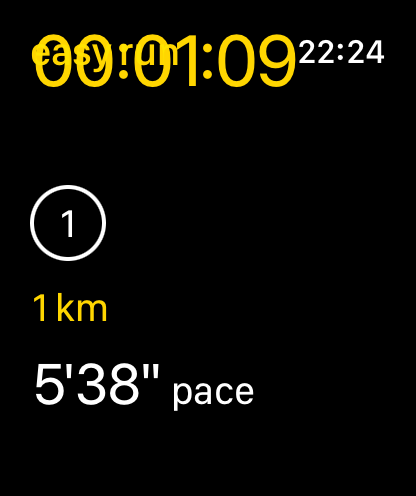
We sent this exact image to several vision models with prompts like “Does this Apple Watch screen look correct? Are there any visual bugs?” — and consistently got responses like:
“The screen shows an active workout with a heart rate indicator and pace data. The layout appears clean and functional, with...”
The screen is in three pieces — overlapping. The model can describe the individual elements perfectly. It cannot reliably tell that they’re sitting on top of each other.
This is consistent across providers we tested. Vision models in 2026 recognize content well. They evaluate spatial layout poorly.
To a vision model, the broken screen and the fixed screen both “look like an Apple Watch workout view with timer and pace.”
So AI visual analysis joins the list of things we tried that didn’t work for our use case.
What does work, sort of
The pragmatic stack that’s actually saved us time:
1. Unit tests for the engine (~100 tests, fast, deterministic)
These work because plan generation is a pure-function problem. Configuration in → plan out. No UI. No async. No permissions. Easy to test. Genuinely useful.
2. The standalone Swift CLI for plan inspection
A pure Swift command-line tool that runs the engine outside the app. Compiles in 5 seconds. Runs in sub-seconds. Outputs human-readable summaries:
Beg 42K (rec, 18w) 18w 52 38 16 14 18 197 min/wkBeats opening Xcode + simulator + iOS app + new-plan setup. Inspect what the engine produces → modify code → recompile → inspect again. Sub-minute feedback loop.
This is the single most useful test infrastructure we have. It’s not even a “test” in the traditional sense — it’s a debug visualization tool. But it catches regressions faster than the formal test suite because we use it constantly during development.
3. Manual testing on real Watch hardware
For workout-time changes specifically, there is no substitute. We run with the watch on. We observe. We measure. Slow. Expensive (someone has to actually go run). Catches things no automated test does — performance regressions, real GPS behavior, sensor edge cases.
Our manual rig: Katya wearing the Apple Watch SE 2 with the latest build, me running alongside on the Forerunner 955 for ground truth. Worst case (I can’t make the run): two watches stacked on Katya’s one wrist.
We’ve found more bugs this way over hundreds of runs than any automated suite.
4. Beta users
The most engaged ones will report bugs we couldn’t have caught alone. Performance issues, in particular, slip past everything else and only surface when a real person does a real workout and notices something feels off. Katya — who runs more than the rest of us combined — is the de-facto canary here. If she says “the watch feels slow today,” we go investigate.
5. Snapshot tests for plan output — kind of
Inside the unit test suite, we have golden-file tests: generate plan X, hash the output, compare to expected hash. When the catalog rebalanced, every snapshot test failed at once (intentionally), and we manually reviewed each new plan to confirm the changes were what we wanted. Then re-baselined.
Reasonable for our use case. Requires discipline— easy to rubber-stamp the new baseline and miss a real regression.
What we still don’t have
Four capabilities we wish existed:
- Reliable cross-device sync testing — full story →.
- Performance regression detection on real Watch hardware — a test that says “this view’s body re-evaluation cost is over 50 ms on a real device” would catch a class of bug we currently only find by running outside in the rain.
- Visual regression detection that actually works — vision models can’t, SnapshotTesting is brittle.
- A way to automate “run for 5 km with the watch on, observe whether the UI is smooth” — not a test you can write; the person has to actually run.
So what would we tell another indie team
Test the deterministic stuff hard. Skip the rest. Plan generation, business logic, data transformations → write tests, run them on every commit. UI tests → bare minimum for the top 3-5 user journeys. Treat them as smoke tests. Not bug detectors. Don’t pile on coverage.
Build internal debug tools instead. The plan-dump CLI saved us more time than any test in the formal suite. Tools that let you see what your system is doing > tests that say pass/fail.
Beta users beat UI tests. A real person doing a real workout finds bugs the simulator can’t manifest. Privacy/no-tracking apps like ours can’t lean on telemetry, so explicit feedback is the only signal we get. Cultivate a small group. Treat their emails like gold.
What we’re trying next
Two things we haven’t fully tested:
- Property-based testing for the plan engine. Generate random valid plan configurations, assert invariants on the output (every plan has at least one rest week, total volume is monotonically non-decreasing within phases, etc.). Could catch edge cases we don’t think to write specific tests for.
- Performance budgets for Watch views. Instrument every SwiftUI view body in DEBUG builds; assert no body call exceeds N milliseconds on real hardware.
Neither is in production yet. Both feel more useful than adding more UI tests.
Further reading
- The 308 Fartleks — the unit-test-vs-end-to-end argument, in detail.
- The iPhone-Watch Sync War Story — the testing constraints that pushed us toward the iPhone-simulator workflow.
- Apple — XCUITest
- SnapshotTesting (Point-Free) — the visual-diff library that almost works.
Run Plan is an indie iOS + Apple Watch training planner built by a 2-person team in Amsterdam. No accounts, no ads, no subscription. Your data stays on your device.