
By Dan · February 4, 2026
Matrix Multiplication Doesn’t Make Apple Watch Batteries Last Longer
Or: a year of matrix math, thirty lines of outlier rejection — guess which one ships.
We have just reverted the Kalman filter we have been working on since last February. We started because we believed the Apple Watch’s GPS was good enough — that with a little extra smoothing on top, we could ship the watch-first running app we wrote about in Apple Watch Is Enough. The Kalman filter was the trick we expected to close the gap between raw GPS and a runnable pace number. It did not. We are less sure now than we were then that the watch-first claim holds up at full strength — more on that at the end.
This is the writeup: the problem most apps have on the Apple Watch SE (noisy live pace), our attempt at the textbook fix, why the textbook fix lost, and what we ship instead.
The problem
If you have run with an Apple Watch SE 2, you have seen this. The current-pace number bouncing — 5:38, then 6:42, then 4:51, then 5:55 — on the same effort, the same kilometre, ninety seconds of swing on the display.
We knew the bouncing was not real, and the proof was on my wrist. Our standard test rig is Katya running in the latest build on the SE 2 and me alongside on a Garmin Forerunner 955. Same run, same pace, same air. The Garmin holds 5:30, steady. The SE 2 swings. The runner is not what is changing — the device is.
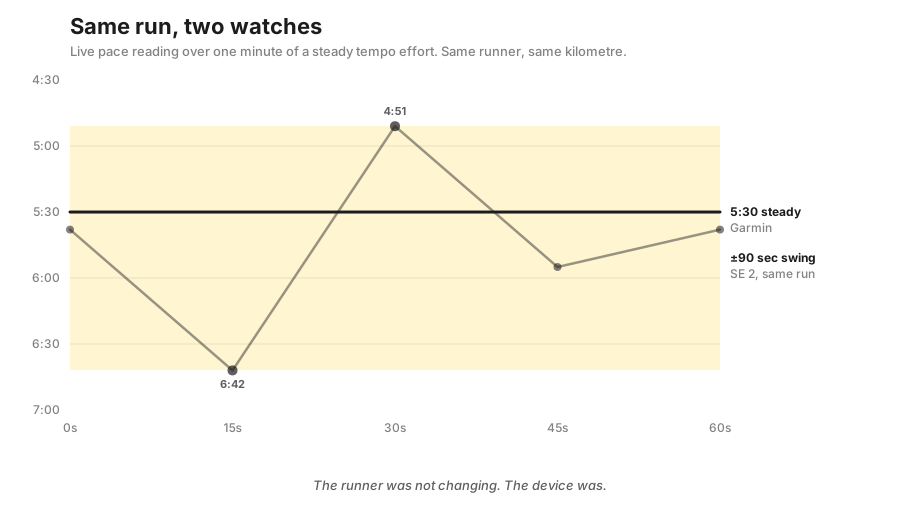
The SE 2’s GPS receiver is single-frequency. Under tree cover or between buildings the position fix wanders five to ten metres an update on a good day, thirty under a dense canopy, fifty-plus in the worst urban canyons. A velocity computed from those positions once a second is far too noisy to put on a screen — and mid-interval, checking whether you are on pace, is exactly when you most want to read it.
The Kalman idea
I had just re-read Tim Babb’s How a Kalman filter works, in pictures — the “robot wandering in the woods” explainer that everyone who has ever wanted to smooth a noisy signal eventually finds. The premise fit our problem exactly: noisy position observations, a smooth underlying velocity, a simple model of how a runner moves. A filter fuses the noise with the model and gives you a clean estimate. The textbook tool for the job.
So I pulled in HCKalmanAlgorithm, an open-source Swift Kalman library built for smoothing CLLocation streams. Six-dimensional state vector, Accelerate-backed linear algebra via Surge, two magic constants whose documentation swears they were “concluded by researchers” to be optimal for GPS:
import Surge   // Apple Accelerate-backed linear algebra
import MapKit

// HCKalmanAlgorithm — open-source Swift Kalman library by Hypercube (2017),
// built for smoothing CLLocation streams. Six-dimensional state vector,
// two magic noise constants whose docs swear they are optimal for GPS.
open class HCKalmanAlgorithm {
    private let stateMDimension = 6
    private let sigma           = 0.0625   // process-noise scaling
    open  var   rValue: Double  = 29.0     // sensor-noise covariance

    private var xk1, Pk1, A, Qt, R: HCMatrixObject
    private var zt: HCMatrixObject!

    public init(initialLocation: CLLocation) { /* ... */ }
    public func processState(currentLocation: CLLocation) -> CLLocation { /* ... */ }
    public func resetKalman(newStartLocation: CLLocation) { /* ... */ }
}
The wiring was a one-liner on top of the Core Location callback we already had. Every reading from CLLocationManager went through the filter:
// In WorkoutManager — every CLLocationManager update goes through here.
var hcKalmanFilter: HCKalmanAlgorithm?

func locationManager(_ manager: CLLocationManager,
                     didUpdateLocations locations: [CLLocation]) {
    guard !isPaused, let first = locations.first else { return }

    if hcKalmanFilter == nil {
        hcKalmanFilter = HCKalmanAlgorithm(initialLocation: first)
    }

    // Apple's own quality gate first — drop out-of-order or stale fixes
    // and anything Core Location admits is worse than 20 m horizontal /
    // 12 m vertical accuracy.
    let validLocations = locations.filter {
        $0.timestamp.timeIntervalSince(self.locations.last!.timestamp) > 0 &&
        -$0.timestamp.timeIntervalSinceNow < 10 &&
        $0.horizontalAccuracy > 0 && $0.horizontalAccuracy < 20 &&
        $0.verticalAccuracy   > 0 && $0.verticalAccuracy   < 12
    }

    // Whatever survived goes into the filter; its output is what the
    // pace calculation downstream reads.
    let smoothedLocations = validLocations.compactMap {
        hcKalmanFilter?.processState(currentLocation: $0)
    }
    self.locations.append(contentsOf: smoothedLocations)
}
The output was beautiful. Smooth pace, no bouncing — the pace bar finally sat still through a steady kilometre.
Reader: it was not the fix.
Then the problems arrived
In roughly this order, over the months that followed.
The watch was paying for it. A Kalman filter is a little linear algebra, but it runs on every GPS reading — about once a second, on the main thread, on top of a workout already spending the chip on sensors, heart rate, display and haptics. On a two-hour long run you could see the cost in the battery curve. Not catastrophic; measurable. And for a training app, where the single most important thing is the watch surviving until the runner finishes, “drains somewhat faster” is not acceptable. We moved the math off the main thread, cut the filter down, pre-allocated everything to avoid churn — each helped a little, none closed the gap.
Then the part I could not tune away. A filter’s whole job is to trade responsiveness for smoothness: smooth hard and the number is clean but always reporting a reality fifteen or thirty seconds old; react fast enough for interval coaching and it starts trusting the noise again and bouncing. I spent more evenings than I would like on the noise parameters and the gain, and every setting bought one problem with another. There is no clever value that makes the underlying problem disappear — at least we never found one. The GPS gives you what it gives you. You can smooth it, or you can react quickly. You cannot do both.
And the simulator was lying. The filter looked perfect in the watchOS simulator, because the simulator feeds it clean synthetic GPS, and clean input produces clean output — ship it. On a real SE 2, in real conditions, the edge cases arrived. An observation history I forgot to bound grew over ninety minutes until the workout crawled. A brief signal loss under a bridge left the filter rejecting the first good reading on the far side as an outlier, freezing the pace for tens of seconds. And a strange beat in the velocity at one particular cadence that I never fully explained. Most of them appeared only on real runs, and diagnosing each one meant shipping a build, putting on shoes, running an hour on the SE 2 with me on the Garmin for ground truth, coming back, and reading logs. Half a day a round. In the rain. After work.
After enough of those it was clear the filter was solving the wrong problem at the wrong price. We could smooth pace beautifully under ideal conditions — but ideal conditions were never the bar. The bar was a runner wearing this for two hours in the rain in a forest, and the watch not dying.
What we ship instead
What we ship is dumber. No matrix math, three layers.
The first throws away the lies. Any reading implying a speed above about ten metres a second — roughly thirty-six kilometres an hour, faster than any distance runner — is discarded. That one rule caught more bad-pace bugs than every Kalman parameter I tried in a year. The GPS occasionally hands you a teleportation event, and there is no filter that turns “I moved sixty metres in a fifth of a second” into a useful signal. You cannot smooth a lie. You throw it away.
The second trusts Apple over ourselves. Core Location attaches its own estimate of how noisy each fix is; if it says it is thirty metres off, we believe it and drop the sample. Cheap, honest, and already computed, sitting on the same thread. Our filter’s confidence gating had been trying to derive exactly this from the data — and Apple had been handing it to us all along.
The third is a rolling twenty-second window: old enough to smooth the jitter, young enough that when you accelerate into a tempo interval the bar catches up in about two breaths rather than dragging for half a minute. We landed on twenty by feel — Katya ran warmup-to-work transitions while I watched the bar; thirty seconds felt sluggish, ten felt jumpy, twenty was right.
All three fit on the back of one screen:
// 1) Reject physically impossible speeds (anything over 10 m/s).
private func isPhysicallyPossible(_ candidate: CLLocation,
                                  after previous: CLLocation) -> Bool {
    let dt = candidate.timestamp.timeIntervalSince(previous.timestamp)
    return dt > 0 && (candidate.distance(from: previous) / dt) < 10.0
}

// 2) Trust Core Location's own accuracy estimate.
private func isAccurateEnough(_ loc: CLLocation) -> Bool {
    loc.horizontalAccuracy > 0 && loc.horizontalAccuracy < 20
}

// 3) Twenty-second rolling window for the on-screen pace. Old enough
//    to smooth single-second jitter, young enough that the bar catches
//    up in two breaths when the runner shifts gears.
private static let paceWindow: TimeInterval = 20
No matrix anywhere. The whole replacement is shorter than the Kalman library’s docstring on sigma.
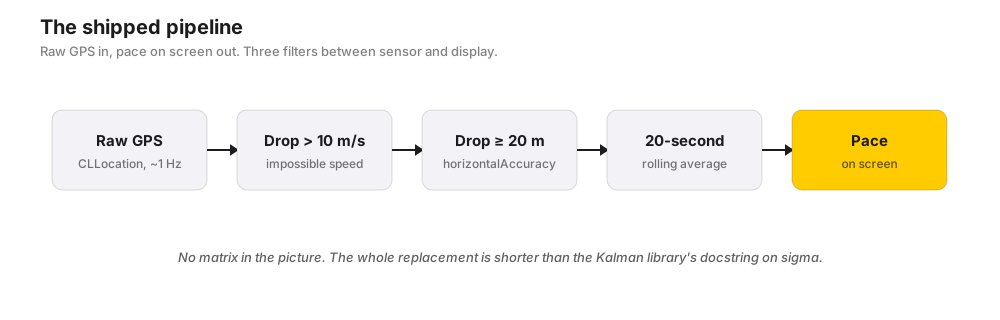
That is the whole thing. The pace number is still a little wobbly — five to ten seconds a kilometre under heavy tree cover — but now it wobbles in a way you can read rather than one you have to interpret. It reacts when you do, it is right on average, it does not touch the battery, and the watch makes it home.
For indoor running, where GPS does not help, we mean to lean on HealthKit’s own running-speed estimate instead. That part isn’t fully dialled in yet — there is a gap between what HealthKit reports and what a brisk treadmill interval feels like, and we are still deciding whether to smooth it ourselves or calibrate it to effort. The outdoor pipeline above is what is actually shipped and stable.
What we would tell ourselves
On the Apple Watch SE, no algorithm beats the chip. Single-frequency GPS is noisy by physics; smoothing trades responsiveness, outlier rejection trades coverage, and no parameter set removes the trade. It was a hardware fact, and we spent a year treating it as a software problem.
Apple’s own primitives were usually enough. We considered HealthKit’s running-speed metric on the first day, dismissed it as too smoothed, and wished weeks later we had been more patient with it. It is boring. Boring shipped.
And sunk cost lies. When you have put real work into something that is almost right, the correct move is sometimes to delete it. The revert is not glamorous, but it was right — and if we started over we would skip the filter entirely. Most of what it taught us was available from shipping the simple version first and watching what it failed to solve. That is the rule now: before writing an algorithm, check whether the system already gives you the metric, and try the dumb version before the smart one.
What this means for “Apple Watch Is Enough”
The whole reason we tried the filter is that we had made a confident claim five months earlier — that for the parts of the run that matter, the watch on its own is enough. The Kalman experiment was an attempt to make the pace number live up to that claim under any condition we could throw at it. The experiment failed in a specific way: not because our code was bad, but because single-frequency GPS on a forest path may simply not be a good enough sensor to give a runner a stable per-second pace, no matter what software you put on top of it.
So: for running the workout, the audio cue, the haptic, the heart-rate read, and the start-and-stop ritual, we still think the watch is enough. For a steady, second-by-second pace number under tree cover on an SE 2, we are less sure than we were. That is not a retraction of the manifesto. It is a flag on the part where it is weakest, written down before we forget.
Further reading
- Tim Babb — How a Kalman filter works, in pictures — the explainer that started this. Best Kalman intuition pump on the internet.
- Surge — the Accelerate-backed Swift linear-algebra library the Kalman implementation was built on. Worth knowing about regardless of whether the Kalman ever shipped.
- Apple —
CLLocationdocumentation —horizontalAccuracyis the property that did the work we tried to derive ourselves. Worth a re-read before reaching for a filter. - HCKalmanAlgorithm — the open-source Swift Kalman library we used (by Hypercube, 2017). Mirrored in several places; if you go looking, make sure you grab the one that imports
Surge. - Apple Watch Is Enough — the manifesto this story is in conversation with.
Run Plan is an indie iOS + Apple Watch training planner built by a 2-person team in Amsterdam. No accounts, no ads, no subscription — every plan is free for now. Your data stays on your device.