
By Dan · March 15, 2026
The Architecture of an Indie Apple Watch App
In August 2025 we spent a weekend moving about thirty Swift files out of flat Views/ and Models/ folders into feature folders. Two days of work that has saved us hours of friction every week since. It is the most important refactor in the project so far, and the rest of this article is variations on the same theme — wrong turns, dependencies we came to regret, and the one file that reached 2,055 lines before we split it last week.
The starting point
January 2025. We sat down and estimated the project at two to three months. The plan:
- A calendar view. How hard can a calendar be?
- A plan generator. ChatGPT writes one from a single prompt, surely.
- Push the workouts into Apple Fitness through whatever API Apple provides — other apps push to Garmin all the time.
All three assumptions were wrong, in different ways. Apple’s WorkoutKit can push a structured workout to the Watch, but the workout then runs in Apple’s app with Apple’s alerts — no live feedback, no custom cues, nothing close to Garmin Connect’s training API. To coach the intervals yourself you build your own Watch app on HealthKit’s lower-level pieces. Garmin does have one, but it is business-only — application, approval, commercial terms — and a custom watch experience there means Connect IQ in Monkey C, Garmin’s own language. Available, but aimed at companies, not at two people prototyping on weekends.
And the plan generator: a chat model produces something that looks like a plan but is not structurally consistent — fine for a casual user, wrong for a training tool. SwiftUI calendars are the same — fine for show, but the moment you need a real month grid that scrolls, scales, marks events and refreshes from a Watch sync, you are writing it yourself.
Run Plan began as Katya’s MVP while she trained for the Amsterdam Marathon; I joined a few weeks later. The first commit in our shared repository is from March 2025. About a year of evenings and weekends since, from two people with full-time jobs. “Two to three months” is off by a factor of roughly five so far, and counting.
The early architecture was, generously, “make it work.” One big file, UI mixed into logic, Core Data fetches inside view bodies. The plan logic lived in a single file that eventually passed two thousand lines. The root view owned all of the app’s state through dozens of properties. The calendar was an open-source UIKit library. The Watch app talked straight to Core Data. It worked, it was fragile, we knew it, and we had no time to fix it. The story of the architecture since is mostly the story of paying that debt back, three or four big refactors at a time.
Feature folders (August 2025)
Over that weekend the codebase went from flat folders to feature-based:
Features/   Plans · Workouts · Activity · Analytics · Onboarding · Settings
Services/   Data · Health · Location · Connectivity · Notifications
Shared/     code both the iPhone and Watch targets use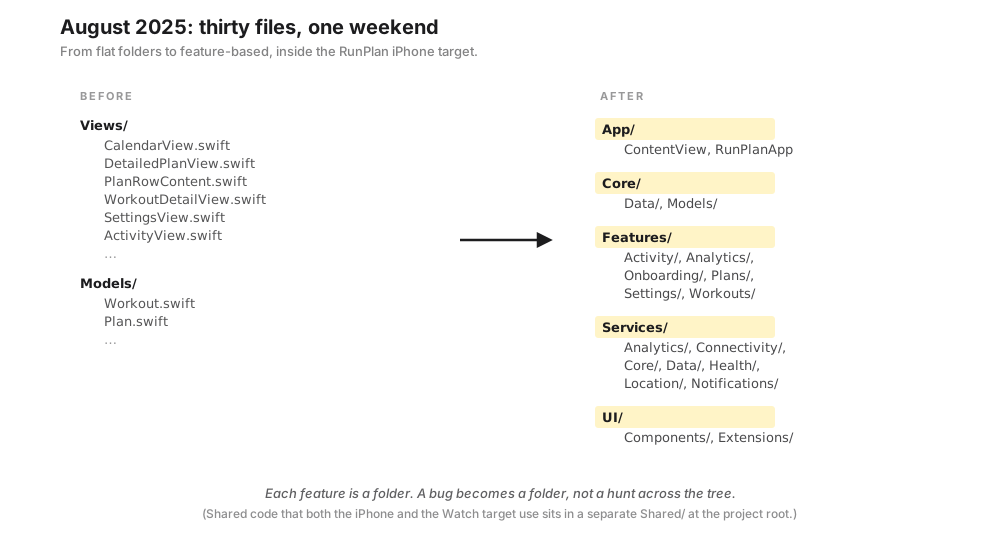
Each feature owns its own views, models and view-models; the services are domain-specific. Every change since has started from a clear place — a new feature is a new folder, a bug is a feature first and a service second. If you start fast and get the structure wrong, fix it before you have fifty files. The cost grows with the pile.
The Core Data schema (November 2025)
The first schema was a single event that held everything: the planned workout, its completion, the actual metrics, the plan it belonged to, its scheduling state. It worked until it did not. The rewrite split it into the pieces that genuinely have different lifetimes:
Plan— the durable shell. One per training cycle: race distance, race date, level, days per week. Lives until the runner deletes it; everything per-day below it churns constantly while this stays put.WorkoutTemplate— the reusable workout description. Title, type, target load. About 590 of them ship bundled with the app and the engine never authors a new one — it picks. Effectively read-only at runtime.CalendarEvent— one per scheduled day. Ties aWorkoutTemplateto a date and carries the per-day state the runner actually touches: completion, cancellation, swap (when they replace the suggested workout with a different template), the finished time. This is the entity the calendar grid renders directly.Intervals— ordered child rows owned by aWorkoutTemplate. Type (warmup / work / recovery / cooldown) and duration, in order. Separate from the template because the template’s structure and its name need to evolve independently.MetadataStore— a small key/value bag for plan-level things that did not deserve their own entity: active plan ID, last-synced timestamp, dump-tool flags, schema version. The “everything else” drawer, deliberately fenced so it stays small.
That is roughly the schema today, and the three targets (iPhone, Watch, widget) share one Core Data store through an App Group container.
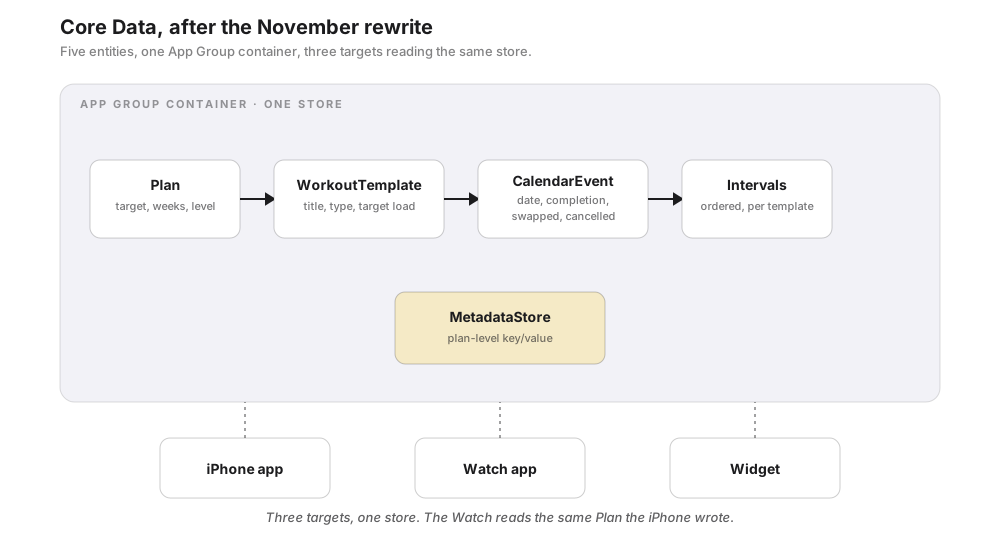
It cost about a week, plus a painful migration: some users had to recreate their plan because the lightweight migration failed on old data shapes. We learned to test migrations against real user-data dumps before shipping a schema change.
The 2,055-line file (split March 2026)
By January the load-calculation file did everything: the configuration for every distance-and-level combination, the phase math, the weekly target calculation, the workout scoring and distribution, the hard/easy interleaving, the deload reshaping, the race-week logic. All in one place. 2,055 lines. The test coverage was reasonable; the file was unsearchable — the kind you only open when you have a clear hour ahead of you.
In March we split it over about a week. First the housekeeping — dead code, warnings, naming. Then the app state. The root view had grown into an 800-line object holding plan state, HealthKit sync and the event rebuild; we pulled all of that into one dedicated state object, and the root view went back to being a thin shell that hosts the UI. Then the big file came apart into three — configuration, the generator, and workout distribution. The 1,300-line plan-setup screen shed its view models as well. A file you can navigate is a file you can change without fear, which we were about to need: the catalog audit we are starting this week would have been miserable in the old shape.
The calendar we wrote ourselves (March 2026)
This is the dependency story. We started with an open-source UIKit calendar library for the month view, which was the right call at the time — a working calendar in twenty minutes. The friction grew slowly. A sync from the Watch refreshed the data and the library reset to the current month, jumping you away from wherever you were scrolling. Switching tabs sometimes brought you back to the wrong month. Hosting a UIKit calendar inside SwiftUI fought the safe area, dynamic type and the rest of the layout. And when iOS 26 brought Liquid Glass, the old UIKit rendering looked dated beside everything around it. The library was not actively maintained, so no upstream fix was coming, and after a few weekends of patches that each added their own regressions, we opened a fresh file and wrote a replacement.
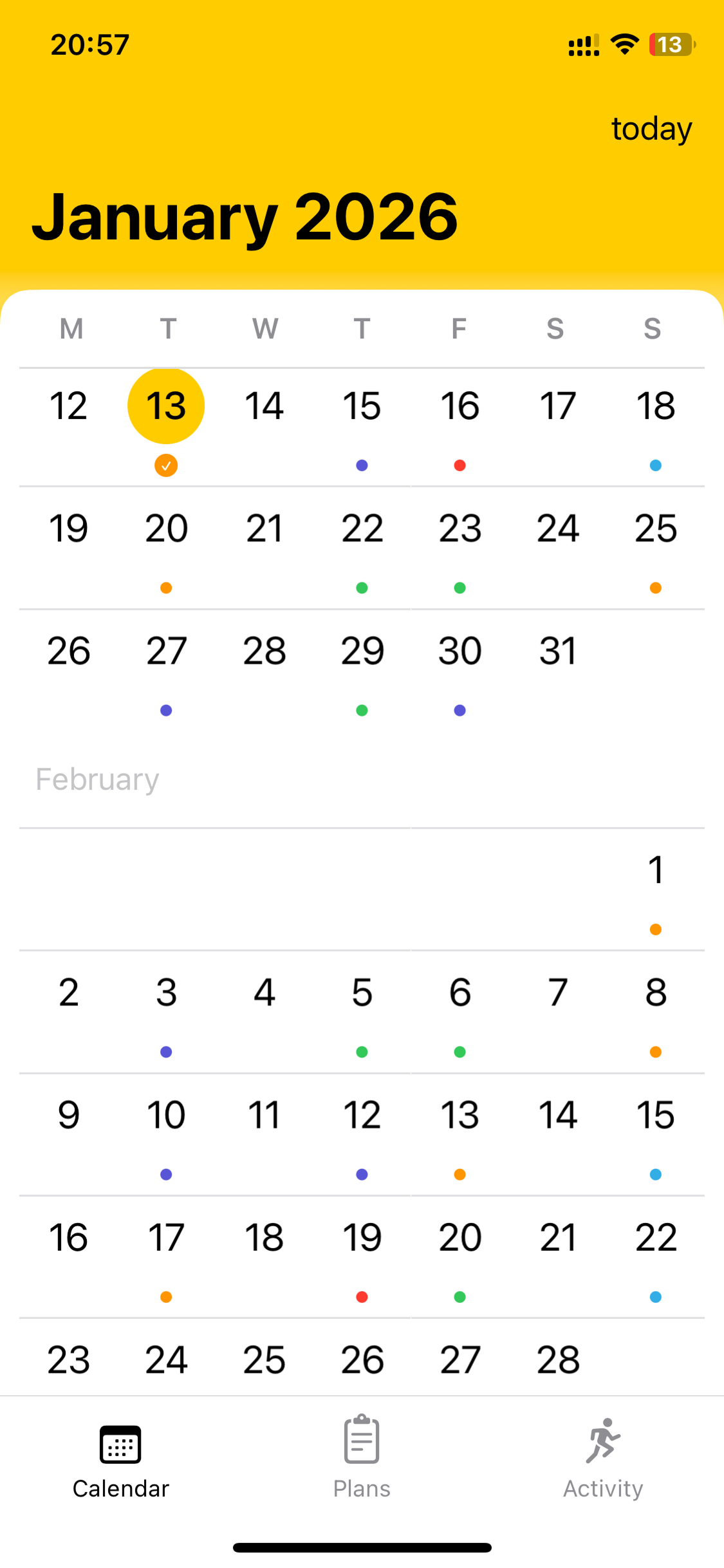
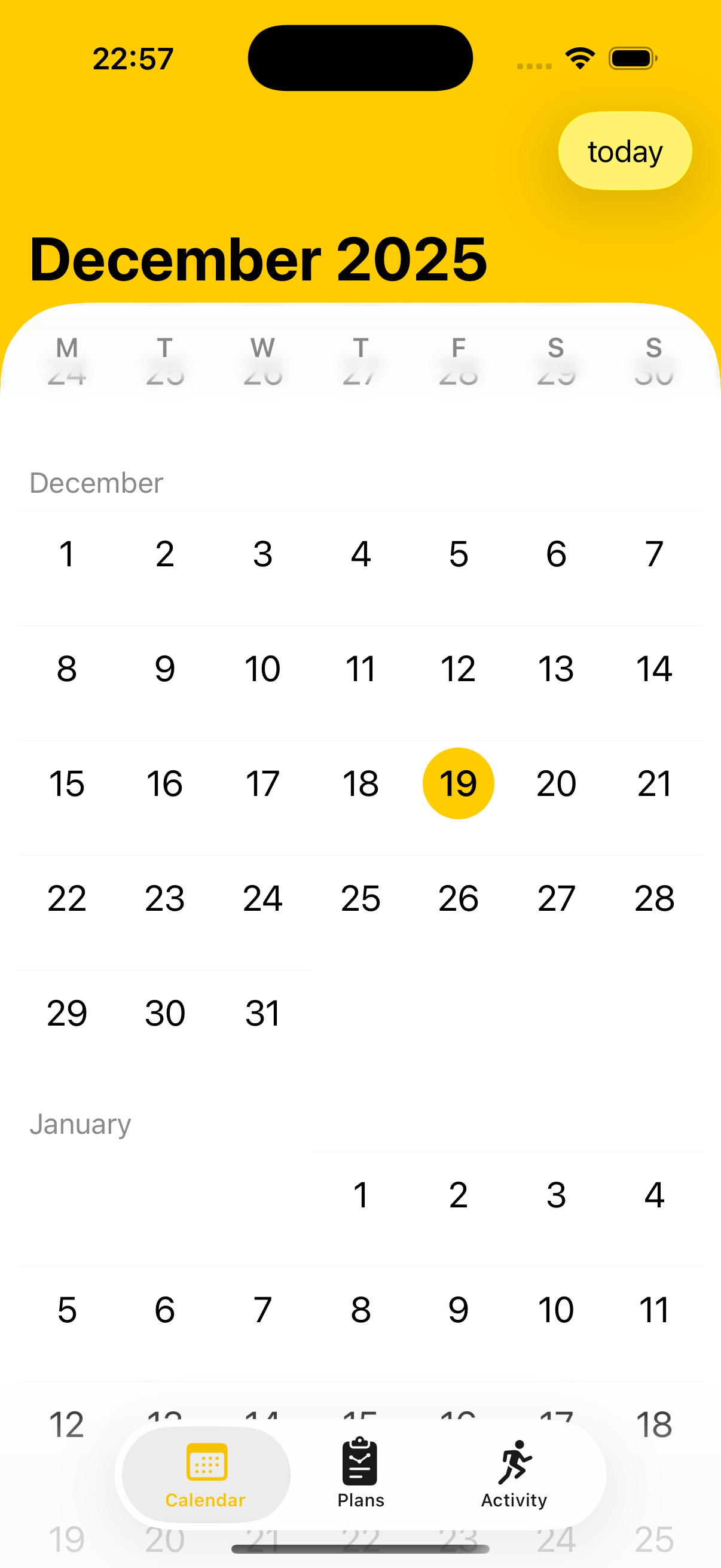
About 600 lines of SwiftUI: a lazy stack of month grids, scroll-to-today, a sticky glass weekday header, event markers for completed, cancelled and race days. Less complete than the library on day one, but native, ours to fix, shaped to our data, and visually part of the app.
// The whole calendar is a lazy vertical stack of month grids — only the
// visible ones render, the rest are placeholders. Sticky weekday header
// rides the iOS 26 glass at the top; event markers read straight off the
// shared Core Data store, so a sync from the Watch updates the dots
// without a refresh dance.
struct CalendarMonthList: View {
    let months: [Date]              // contiguous months around today
    @Binding var selected: Date

    var body: some View {
        ScrollViewReader { proxy in
            ScrollView {
                LazyVStack(spacing: 24) {
                    ForEach(months, id: \.self) { month in
                        MonthGrid(month: month, selected: $selected)
                            .id(month)
                    }
                }
            }
            .safeAreaInset(edge: .top) { WeekdayHeader() }
            .onAppear { proxy.scrollTo(Date.today.monthStart, anchor: .top) }
        }
    }
}
An open-source dependency is a relationship. Day one is free; day four hundred is paid. When the library does not closely match your domain, the cost of working around the mismatch keeps growing. Sometimes the right move is to write your own — but only once the friction is concrete and recurring, not before.
How many times we have rewritten load calculation
Three so far, probably four by the time the audit finishes. The first version, in the spring of 2025, was inline: each workout carried a hardcoded load number and the engine summed them by week. The second, that August, was target-based — a weekly target from a base times a phase multiplier times a level multiplier, with the engine picking the workout whose load matched best. The third, over the winter, added the smooth phase transitions, the mid-phase recovery and the deload reshaping: most of the math the engine runs today. Each rewrite came from a specific failure of the one before; the third exists because the second produced jarring jumps between phases. Getting a plan engine right takes a training phase of its own — months of audits against real reference plans. There is no closed-form answer you implement once.
Where it stands
Today: feature folders on the iPhone, the 600-line calendar we wrote, Core Data through an App Group container the Watch and the Widget read too, HealthKit as the system of record, no backend. As of this week, a small plan-dump tool that compiles in five seconds and runs without the simulator.
Two things we would do differently
- Reorganized too late. Feature folders should have happened at fifteen files, not thirty.
- The plan-dump tool should have been week two, not month thirteen. Being able to see what the system produces accelerates everything else.
Two things we got right
- No backend. Every “should we add a server for this?” has had the same answer.
- The plan engine is a pure function. Same inputs, same outputs. That property made the tests easy and the dump tool possible.
Still open
- Schema migrations are tested on fresh installs, not the upgrade path from every prior schema. Has to be fixed before we ever charge.
- Plans do not adapt yet. The next real piece of work.
What has worked
Move slowly. Refactor often. SwiftUI wherever possible. Core Data over the newer, more tempting option. HealthKit as the system of record. No third-party SDKs unless we truly need one. One language, one platform, one team — the constraints make the decisions.
The architecture is not perfect, and there are corners we would rebuild from scratch. But it is the architecture of an app that works, ships, has real runners using it, and survives both authors holding full-time jobs.
Further reading
- iOS 26 ‘Liquid Glass’ — what finally made the old calendar untenable.
- Apple Watch Is Enough — the wrist-first thinking behind the app.
- The iPhone–Watch Sync War Story — the boundary between the two apps, in detail.
Run Plan is an indie iOS + Apple Watch training planner built by a 2-person team in Amsterdam. No accounts, no ads, no subscription — every plan is free for now. Your data stays on your device.